General description
When x_Enable = TRUE, the module is enabled. Operational readiness is indicated when x_Active = TRUE.
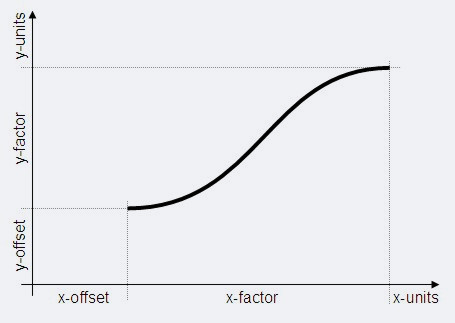
A positive edge at x_Start starts the movement. Note here, that the position of the axis (di_yPos) is the same as the y-offset (di_yOffs) and the position of the master axis is less than or equal to the x-offset (di_xOffs).
The setpoint value (di_yPos) of the axis di_yPos is then calculated based on the master position (di_xPos). If the master position is located before the starting point of the cam (di_xPos < di_xOffs), di_yOffs is output at di_yPos. If the master position is located after the end point of the cam (di_xPos > di_xOffs + di_xFact), di_yOffs + di_yFact is output at di_yPos. The end of the cam is indicated when x_CamDone = TRUE for a cycle. The next cam can then be started. The position of the axis and/or master axis can be manipulated for the next cycle at the end of the cam. For this purpose, the positions of the axis and the master axis are manipulated in accordance with the specifications ui_SetPosMode, di_xSetPos and di_ySetPos.
Additional positioning is possible with the TB_CamAdd and TB_PosAdd modules, for example.
The movement arises from the scale of the saved cam. The starting point of the movement and the length in the x- and y-directions are specified for this purpose. The scale can be changed for each start.