


General description
This FB calculates the Ks factor depending on the actual diameter. There are two methods implemented for the calculation. One option is the step-function and the other is the e-function. The prefered method can be set in "i_TypeExp".
1. Output like step function
With the step function you can set 8 different diameters. The settings are listed exemplarily.
Adjustment of the diameter (Max. 1600 mm to Min. 100 mm)
a_Steps_KS_Range[0] := 16000 [1/10 mm]
a_Steps_KS_Range[1] := 15000 [1/10 mm]
a_Steps_KS_Range[2] := 14000 [1/10 mm]
...
a_Steps_KS_Range[8] := 1000 [1/10 mm]
Adjustment of the Ks factor:
a_Steps_KS_Value[0] := 150000.0 [-]
a_Steps_KS_Value[1] := 120000.0 [-]
...
a_Steps_KS_Value[8] := 3000.0 [-]
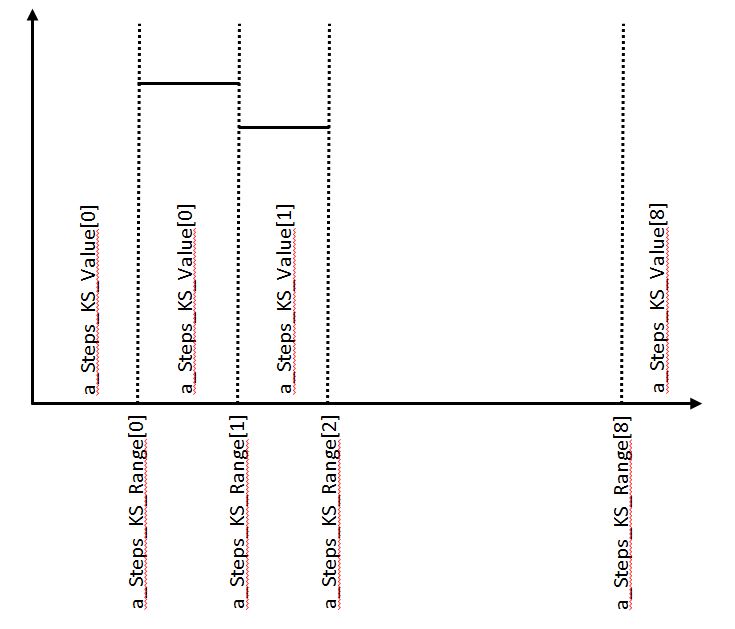
The winder diameter should stay within the adjustable range (a_Steps_KS_Range[0] >= ud_Diameter_Act >= a_Steps_KS_Range[8]). If the actual diameter exceeds these limits, the Output "r_KS-Faktor" shows the min or max value of the set range (see picture above). In this case the Output "w_Error_Info" will show an error message which has no effect on the usability.
To prevent the Ks factor from jumping to another value when the next diameter section is reached, the Output can optionally be delayed by a P-Controller. The Gain factor is parameterized by the input "r_Ramp_Kp". A zero at this input deactivates the functionality and sets the Ks value without delay.
2. Output like e-Function
To achieve a dynamic adjustment of the Ks-Factor, an e-function can be parameterized. The Ks value is calculated like following:

With this function, the calculated Ks value is send directly to the output without delay.